2 years ago
Showing posts with label SQL Error Messages. Show all posts
Showing posts with label SQL Error Messages. Show all posts
Tuesday, January 6, 2009
Error: 5123, Severity: 16, State: 1 when moving TempDB
This post has been migrated to my new blog on SQLBlog.com. You can find this post at the following address:
Thursday, December 4, 2008
SQL Server Backup Fundamentals - Mirrored Backup vs Striped Backup
SQL Server Backup isn't necessarily the easiest thing in the world to do. I've seen a few posts recently where the poster is performing a restore operation and encounters the following error message:
TITLE: Microsoft SQL Server Management Studio
------------------------------
Restore failed for Server 'ServerName'. (Microsoft.SqlServer.Smo)
------------------------------
ADDITIONAL INFORMATION:
System.Data.SqlClient.SqlError: The media set has 2 media families but only 1 are provided. All members must be provided. (Microsoft.SqlServer.Smo)
For help, click: http://go.microsoft.com/fwlink?ProdName=Microsoft+SQL+Server&ProdVer=9.00.1399.00&LinkId=20476
------------------------------
BUTTONS:
OK
------------------------------
What is really sad is that the person encountering this error is often in the midst of a disaster recovery, and unfortunately, they are learning the hard way why testing your backups early, and testing your backups often is a recommended best practice for a reason. Unfortunately, if you find yourself with this error and this is the only backup of the database you need to restore, you are in serious trouble, because just like a RAID 0 disk, there is no way to rebuild your database without all the backup files in the media set present. At this point, you might not believe me, and you certainly have that right, but I am presenting the cold hard truth and you can validate this by doing a Google Search or a Windows Live Search.
So how exactly does this particular error come about? For more than a few people it has been caused by SQL Server Management Studio, and confusion about the UI for backing up a database.
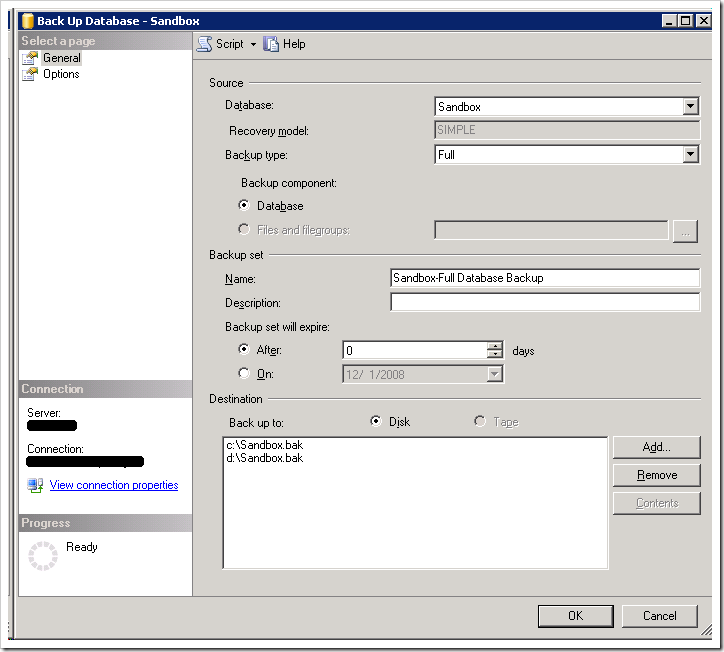
To someone new to SQL Server, this looks like it might be performing a backup to c:\Sandbox.bak and making a duplicate or mirrored copy to d:\Sandbox.bak. In reality, this is not the case. Instead this is performing a striped backup similar to a RAID 0 disk which will write the data round robin to all of the files listed. Striping backups can be used to improve performance of the backup operation, especially for VLDB's using multiple drives with dedicated I/O channels to each of the drives. The backup TSQL command from the above scripted out would be:
BACKUP DATABASE [Sandbox]
TO  DISK = N'c:\Sandbox.bak',
    DISK = N'd:\Sandbox.bak'
WITH FORMAT,
NAME = N'Sandbox-Full Database Backup',
SKIP, NOREWIND, NOUNLOAD,  STATS = 10
GO
To create a mirrored backup, you can't use the UI in SQL Server Management Studio, you actually have to use TSQL Scripts following the Book Online entry for BACKUP DATABASE. The MIRROR TO option is used to create the mirrored backup as follows:
BACKUP DATABASE [Sandbox]
TO  DISK = N'c:\Sandbox.bak'
MIRROR TO DISK = N'd:\Sandbox.bak'
WITH FORMAT,
NAME = N'Sandbox-Full Database Backup',
SKIP, NOREWIND, NOUNLOAD,  STATS = 10
GO
The bad thing as I stated previously in this post is that someone doesn't realize the mistake until it is to late. When was the last time that you tested your backups? Testing would have caught this problem well ahead of it actually being a problem.
Saturday, July 12, 2008
SqlDateTime Overflow after Upgrading to SQL 2005 From SQL 2000
If you upgrade to SQL 2005 by Backup/Restore, it is possible that you will receive the following error when you issue a select statement against a table with a Datetime column in it:
An error occurred while executing batch. Error message is: SqlDateTime overflow. Must be between 1/1/1753 12:00:00 AM and 12/31/9999 11:59:59 PM.
This error is not caught by a standard DBCC CHECKDB. The books online for DBCC CHECKDB says:
Under some circumstances, values might be entered into the database that are not valid or out-of-range based on the data type of the column. In SQL Server 2000, DBCC CHECKDB does not perform range or integrity checks on these column values. However, in SQL Server 2005, DBCC CHECKDB can detect column values that are not valid for all column data types. Therefore, running DBCC CHECKDB with the DATA_PURITY option on databases that have been upgraded from earlier versions of SQL Server might reveal preexisting column-value errors. Because SQL Server 2005 cannot automatically repair these errors, the column value must be manually updated. If CHECKDB detects such an error, CHECKDB returns a warning, the error number 2570, and information to identify the affected row and manually correct the error.
Once you follow these directions, your should no longer encounter this problem, since databases in SQL 2005 have data validation checks in place.
For more information see:
Tuesday, March 4, 2008
Understanding 'login failed' (Error 18456) errors in SQL Server 2005
This post has been migrated to my new blog on SQLBlog.com. You can find this post at the following address:
http://sqlblog.com/blogs/jonathan_kehayias/archive/2008/03/04/understanding-login-failed-error-18456-errors-in-sql-server-2005.aspx
http://sqlblog.com/blogs/jonathan_kehayias/archive/2008/03/04/understanding-login-failed-error-18456-errors-in-sql-server-2005.aspx
Subscribe to:
Posts (Atom)