Showing posts with label Miscellaneous. Show all posts

Monday, September 14, 2009

OT: Internet Explorer 8 Multiple Tabs = Multiple Processes

This has nothing to do with SQL Server, but it was something that I noticed today and had to do a bit of research for.  I recently upgraded from IE6 and IE7 on my work machines to IE8 since my Windows 7 Laptop uses IE8 I kind of got used to having some of its features.  By my very nature I tend to over work the common computer by having to many screens open as I jump around from task to task, and problem to problem. At any given point in the day, it is common for my task bar to be scrolling and it is currently set to hold three rows of applications.

I previously made use of FireFox to take advantage of the multiple tabs, but have been using IE8 for the same feature.  (Chrome users, yes I know about it, no I don't care to try it, so please save comments about switching to Chrome :-) )  Today I had once again overworked my desktop to the point that it was having trouble switching screens, and it was especially having trouble switching tabs in IE8.  Curious whether or not a machine inventory (automated asset tracking software) or virus scan had been kicked off mid-day, I opened task manager and found a screen full of iexplore.exe processes. 

image

Turns out this is by design in IE8:

http://blogs.msdn.com/ie/archive/2008/03/11/ie8-and-loosely-coupled-ie-lcie.aspx

I also happened on this blog:

http://blogs.msdn.com/askie/archive/2009/03/09/opening-a-new-tab-may-launch-a-new-process-with-internet-explorer-8-0.aspx

that shows how you can loosely control the configuration of this.  I am not sure that this feature is actually a benefit to me.  I am certainly using more memory and as shown in my screen shot above CPU from this.  What is really bad is that IE 8 is listed as an Important Update in Windows Update Services.

Thursday, September 3, 2009

(CSS) - Updated Support Policy for Virtualization of SQL Server

Microsoft updated the Support Policy for running SQL Server Virtualized today.  The CSS Team Blog has a post that provides a quick overview of what's changed as well as a link to the new policy:

http://blogs.msdn.com/psssql/archive/2009/09/03/another-update-for-the-support-policy-for-virtualization-for-sql-server.aspx

Now I haven't personally looked at the SVVP approved vendor list in a long time but I decided to take a glance today at it, and there are a bunch of new approved platforms:

http://www.windowsservercatalog.com/results.aspx?&bCatID=1521&cpID=0&avc=0&ava=0&avq=0&OR=1&PGS=25

The key topics to make note of in the updated policy which can be found on the following KB Article are listed in the Restrictions and Limitations and include the inclusion of Guest Failover Clustering Support if you are on Windows Server 2008 and meet the requirements of Windows Server 2008 Failover Clustering, and the lack of support for Virtualization Snapshots.

Friday, January 16, 2009

Wordle and blog content

This post has been migrated to my new blog on SQLBlog.com. You can find this post at the following address:
http://sqlblog.com/blogs/jonathan_kehayias/archive/2009/01/16/wordle-and-blog-content.aspx

Thursday, January 15, 2009

Windows Live Writer 2009 Released

... and yes this blog post was made with the newest non-Beta version of the tool.  I usually just stick to post regarding SQL Server, but this one has nothing to do with SQL Server aside from the fact that I use Windows Live Writer to Blog about SQL.  If you have a blog, are new to blogging, or are planning on blogging in the future, give Live Writer a look test.  It is free, and it connects to most public blogging sites without any real configuration.  All you have to do is install it, point it to your blog, provide your username and password and it is ready to publish anything you type up.

http://download.live.com/writer

Some reasons I use Live Writer:

  1. I can start a new blog entry and save it locally when I get ideas that I'd like to blog about but don't have the time to dedicate to writing the entry.
  2. It has a Microsoft Word like interface that is familiar.
  3. It accepts plugins that allow you to do things like add tag clouds, insert videos, pictures, formatted code (this doesn't work out so hot with blogger.com as I learned a few months back due to CSS issues and overlaps).

You can also manage multiple blogs with a single install of Live Writer.  I think it is one of the better tools I have in my blogging toolbox.

Sunday, January 4, 2009

Goals for 2009

A lot of people have been blogging lately about their New Years Resolutions and goals for 2009.  I had intended to blog this earlier, but I have been busy working on the Extended Events Manager app that I wrote for the SQL Heroes contest.  I prefer to set goals rather than make resolutions since goals are measurable and resolutions tend to not be accomplished. 

My number one goal for this year is to continue to dedicate a block of time to my family each day, since they are the number one priority in my life, and the older my daughter gets, the faster time seems to go by, especially with a second child due in June.  My second goal is to attend and graduate from the US Army Drill Sergeant Academy to further my military career.

As far as technical and career development my goals would be as follows:

  1. Remain consistent in technical blog posts averaging 3 a week for the year.
  2. Finish coding on the Extended Events Manager App to make it a one stop shop for creating, altering and consuming Extended Events in SQL Server 2008.
  3. Continue to answer posts on the MSDN and SqlServerCentral Forums.
  4. Present at least one session at a major event, (ie TechEd, SQLConnections, PASS Summit, etc.)
  5. Submit an article for publication at least once a quarter to an online site or magazine publication.
  6. Continue to present sessions at SQL Saturday and local Code Camp Events.
  7. Complete my MCITP SQL Server 2008 Administrator Certification.
  8. Take the Oracle Certified Associate Database Administrator Certification test.

I have a few other goals that I would like to accomplish as well, time permitting, but we'll see how the above eight pan out first.

Tuesday, December 16, 2008

Getting Windows Search to work inside Code Files

Windows Search is a great tool, and the fact that you can search inside of documents for specific text helped me numerous times in college since I could generic search a folder of source information to find matches without having to actually scan (read) the documents myself.  You can see how to do this in the following image:

image

However, since I started with SQL I have never been able to get it to search inside of my .sql/.vb/.cs code files.  With the forums migration on MSDN today, I spent most of the day goofing around in the NNTP Newsgroups for SQL where someone asked about searching inside code files.  A quick google search turned up the following:

With Windows XP the default behaviour for searching within files will ignore .SQL files.

To get around this you can add a registry setting which will force Windows to treat .SQL files as text so it can search within the file.

  1. Open regedit
  2. Go to HKEY_CLASSES_ROOT\.sql
  3. Add a new key PersistentHandler
  4. Set the default value for the key to {5e941d80-bf96-11cd-b579-08002b30bfeb}

That’s it. You can do this for any other file type as well.

This information is thanks to the following blog post by Perry Stathopoulos:

http://pstatho.wordpress.com/2007/08/20/getting-windows-to-search-within-sql-files/

I had to log out and log back in for it to take effect, but one of our developers didn't have the same issue, so if it doesn't work, give a logoff or reboot a shot.

Thursday, December 11, 2008

SQL Server Management Studio Object Explorer Autohide Delay

One of the most popular pages on my blog for some reason is the Setting Auto-Recovery/AutoSave in SQL Server Management Studio post I made back in July.  I don't usually recommend that someone hack their registry manually, but in some cases it is the only way to make the changes because the tools available in the application don't allow for it.  SQL Server Management Studio is one of those applications whose configuration options in the registry are not adequately exposed in the tools or options menus.

Since that little hack was so popular, I figured I would post another one, but first the needed warnings:

DISCLAIMER:

Editing the registry is not generally recommended, and/or supported.  If you choose to do so, you are doing it at your own risk.  I am not responsible for damage caused by you editing the registry manually.

Coming once again from the MSDN Forums, this hack involves changing the speed with which the Object Explorer auto hide occurs.  A post back in October commented that the delay for the autohide was to long in SQL Server Management Studio, and wanted to know how to change the time it took to be faster.  Of course this is not documented anywhere online, so I went back to my July post, and started looking at the various registry keys that were available for Management Studio in one of my VPC's.  What I found is the following:

You can edit the following Registry Key:

HKEY_CURRENT_USER\Software\Microsoft\Microsoft SQL Server\90\Tools\Shell\General\AnimationSpeed

The higher the value, the faster it will close.  At Hex value 20 it is almost immediately closed.

You can disable the Animations completely by changing:

HKEY_CURRENT_USER\Software\Microsoft\Microsoft SQL Server\90\Tools\Shell\General\Animations

and setting it to a value of 0.

If it helps you out, cool, but if you break it, don't email any scathing comments to me about editing your registry manually.  I am only going to refer you back to the Disclaimer above.

Tuesday, December 9, 2008

SQL Quiz #1

This post has been migrated to my new blog on SQLBlog.com. You can find this post at the following address:

http://sqlblog.com/blogs/jonathan_kehayias/archive/2008/12/09/sql-quiz-1.aspx

SQL Quiz Part 2

In early November Chris Shaw started a chain blog of sorts called SQL Quiz where he called out two well known members of the SQL Community Brent Ozar and Jason Massie to post about their two biggest mistakes as SQL Server DBA's.  I subscribe to both of their blog feeds and thought it was interesting to read about other peoples mistakes.  Chris's intent was to create a chain of posts from well known people in the SQL Community that the community could learn from.  The chain circled around a fairly large group of people including SQLBatman.  It did not however, include me, which I was just fine with.

Well our would be phantom of the night decided to call me out on Chris Shaw's new SQL Quiz Part 2.  The Questions for this quiz…What are the largest challenges that you have faced in your career and how did you overcome those?

Here are my answers...

The largest challenge I have faced in my career has to be making the decision to leave a stable job where I wasn't being allowed to progress in my career as I wanted to, and find another job. I tend to be a very loyal person, almost to a fault.  I stick it out with through thick and thin, and dedicate myself 100% to anything that I do.  I can always find the half full side of the glass, though it may not seem like it is there.  When I made the decision to leave my last job, it was at the start of the real estate market decline, and moving jobs also meant moving cities, and having to sell my condo. 

After contacting a recruiter, I immediately had two great interviews, one with a Christian motivational speaking and marketing company, and one with my current employer OSI Restaurant Partners.  The first company was immediately interested and made an offer on the spot that paid more than the job I was leaving, but the environment felt like the same old same old to me.  OSI on the other hand had a excellent atmosphere, much larger environment, and I would be treading new path as the first SQL DBA they had hired, but they wanted to interview other candidates before deciding anything.

No real big deal there, I still had my job, and I wasn't really in a rush since I was leaving under my own terms.  Recruiters being what they are, they wanted to close the deal and place me in the first job that presented an offer.  I informed them that I would like to wait until the following Monday and see if OSI had made any decisions yet.  This was on a Wednesday, but I still got a call asking if I had decided about the job offer on Thursday, Friday, and Saturday because the company needed to interview other candidates if I wasn't interested.  Same story every call, same answers from me each time, though I got more and more nervous about my decision with each and every call.

Monday morning, and yet another call, at which point I decided I wasn't interested in this company, just because I really wanted to know if I could get a job at a major corporation like OSI at this point, so I told the recruiter thanks, but I would wait for an answer from OSI.  Fast forward two hours, and I get a call back again, this time I'm kind of aggravated because I am at work during the day, and all these calls are distracting.  Turns out OSI decided to offer me the job which I immediately accepted and turned in my two weeks notice, which later had to be extended to three weeks so I could complete my current development project.

A lesson learned from this was not to be wow'd by additional money, and that if you really want something, then you will be willing to wait for it.  It was definitely hard to wait for an offer when I already had one.  Did I happen to mention that my wife kept saying to just take the other job?  I try not to be at odds with my wife, and this caused even more turmoil in the decision process.

My Second Anecdote:

The second hardest thing I have encountered in my career is actually maintaining balance between being a company man, a family man, a military man, an entrepreneur, and a all around geek.  Most people who know me, and all that I am involved with don't know how I keep up with it all.  Setting priorities, and scheduling things appropriately is one of the greatest challenges I have after 4:30pm everyday (I am at work until 4:30pm). 

First thing of importance is my family, and I almost always get my daughter from school (daycare) on my way home.  Then it is off to the house to cook dinner before mommy gets home from grad school.  Sometimes we get side tracked and go to the playground or I chase her around the neighborhood on her Barbie Powerwheel and we go feed the ducks.  While dinner cooks, I jump online and catch up on email from the drive home, trust me it stacks up pretty fast sometimes, responses to Newsgroups and forums postings, and new entries in my blog reader.  After dinner is bath time which my wife and I trade off nights for, but my daughters favorite nights are when I put on my swimsuit and play in the tub with her.  Then we do Dora and Diego, book/playtime, and bedtime.  After bedtime is when I usually get to do most of my playing online, consulting/contract work, and learning while my wife studies and works on her papers and homework. 

Trust me, there is never a dull moment in my life.  One weekend a month I do Army Reserves training, and in 2009, I will be away for 2 months in school for the Army.  The trick for me is, I have fun doing it all.  If it wasn't fun, I wouldn't be doing it.

As for this SQL Quiz thing, I am not sure that I have actually followed the intent of the challenge, but to me those are the two biggest challenges in my career so far.

Now I am going to call out Kendal Van Dyke and Deepak Ranagarajan.

Thursday, December 4, 2008

SQL Server Backup Fundamentals - Mirrored Backup vs Striped Backup

SQL Server Backup isn't necessarily the easiest thing in the world to do.  I've seen a few posts recently where the poster is performing a restore operation and encounters the following error message:

TITLE: Microsoft SQL Server Management Studio
------------------------------

Restore failed for Server 'ServerName'.  (Microsoft.SqlServer.Smo)

For help, click: http://go.microsoft.com/fwlink?ProdName=Microsoft+SQL+Server&ProdVer=9.00.1399.00&EvtSrc=Microsoft.SqlServer.Management.Smo.ExceptionTemplates.FailedOperationExceptionText&EvtID=Restore+Server&LinkId=20476

------------------------------
ADDITIONAL INFORMATION:

System.Data.SqlClient.SqlError: The media set has 2 media families but only 1 are provided. All members must be provided. (Microsoft.SqlServer.Smo)

For help, click: http://go.microsoft.com/fwlink?ProdName=Microsoft+SQL+Server&ProdVer=9.00.1399.00&LinkId=20476

------------------------------
BUTTONS:

OK
------------------------------

What is really sad is that the person encountering this error is often in the midst of a disaster recovery, and unfortunately, they are learning the hard way why testing your backups early, and testing your backups often is a recommended best practice for a reason.  Unfortunately, if you find yourself with this error and this is the only backup of the database you need to restore, you are in serious trouble, because just like a RAID 0 disk, there is no way to rebuild your database without all the backup files in the media set present.  At this point, you might not believe me, and you certainly have that right, but I am presenting the cold hard truth and you can validate this by doing a Google Search or a Windows Live Search. 

So how exactly does this particular error come about?  For more than a few people it has been caused by SQL Server Management Studio, and confusion about the UI for backing up a database.
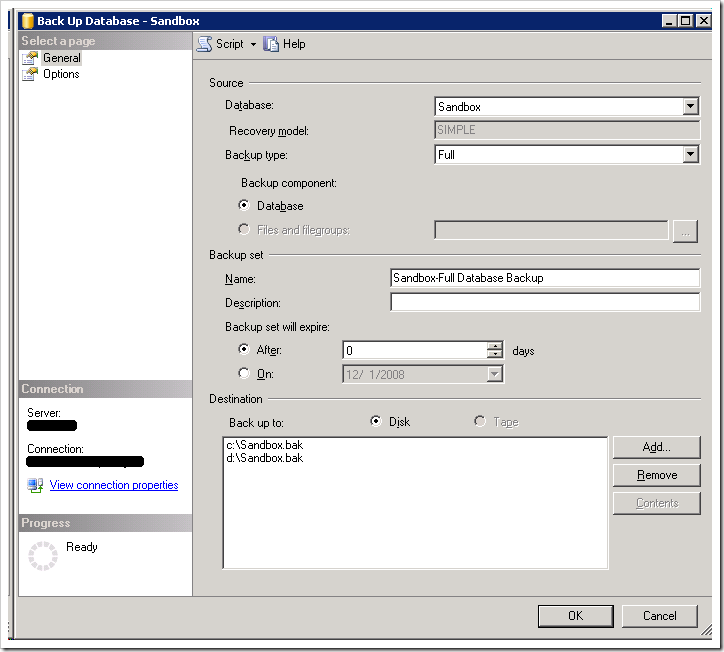
image

To someone new to SQL Server, this looks like it might be performing a backup to c:\Sandbox.bak and making a duplicate or mirrored copy to d:\Sandbox.bak.  In reality, this is not the case.  Instead this is performing a striped backup similar to a RAID 0 disk which will write the data round robin to all of the files listed.  Striping backups can be used to improve performance of the backup operation, especially for VLDB's using multiple drives with dedicated I/O channels to each of the drives.  The backup TSQL command from the above scripted out would be:

BACKUP DATABASE [Sandbox] 
TO DISK = N'c:\Sandbox.bak',
DISK = N'd:\Sandbox.bak'
WITH FORMAT,
NAME = N'Sandbox-Full Database Backup',
SKIP, NOREWIND, NOUNLOAD, STATS = 10
GO


To create a mirrored backup, you can't use the UI in SQL Server Management Studio, you actually have to use TSQL Scripts following the Book Online entry for BACKUP DATABASE.  The MIRROR TO option is used to create the mirrored backup as follows:


BACKUP DATABASE [Sandbox] 
TO DISK = N'c:\Sandbox.bak'
MIRROR TO DISK = N'd:\Sandbox.bak'
WITH FORMAT,
NAME = N'Sandbox-Full Database Backup',
SKIP, NOREWIND, NOUNLOAD, STATS = 10
GO


The bad thing as I stated previously in this post is that someone doesn't realize the mistake until it is to late.  When was the last time that you tested your backups?  Testing would have caught this problem well ahead of it actually being a problem. 

Friday, November 21, 2008

SQL Heroes Contest Winners

The contest winners were announced at PASS, albeit in a very anti-climactic manner. The winners in order shown on the screen at PASS were:

Greg Galloway (with Darren Gosbell and John Welch) http://www.codeplex.com/bidshelper

Jonathan Kehayias http://www.codeplex.com/ExtendedEventManager

John Calvin Welch http://www.codeplex.com/ssisUnit

Ignat Andrei http://www.codeplex.com/CDCHelper/

Jason Massie http://www.codeplex.com/QPee


EDIT:

I was contacted regarding this list, and while I saw that the SQL Heroes blog posted a list of winners on 12/02/2008, I didn't actually notice that it has a different list of winners on it:

http://blogs.msdn.com/sqlheroes/archive/2008/12/02/and-the-winners-are.aspx

So why the difference? I am not really sure. My list came from Brent Ozar who had the same problem I did at PASS Summit. They flashed the list to fast for me to be able to copy it all down. His blog post pointed me to Adam Machanic's blog, who I trust, so I felt safe reposting the same information on here, but apparently there was a discrepancy. See the actual SQL Heroes blog to find the correct list which is:

  • BIDS Helper: Greg Galloway, Darren Gosbell, John Calvin Welch
  • SQL 2008 Extended Events Manager: Jonathan Matthew Kehayias
  • ssisUnit: John Calvin Welch
  • SqlMonitoring Tool: Robert Hartskeerl
  • Allocation SQL Server Management Studio Add-in: Daniel Gould

Wednesday, November 19, 2008

Can a DBA function without rights to the Server OS?

I see posts often regarding questions for what rights should be granted and to whom with regards to SQL server.  On this post I am going to address what rights should a DBA have to the Server itself based on the following question recently from the MSDN Forums:

What is a DBA/sa prevented from doing if not a local admin on the SQL Server?

If you read the above post, you will see that my answer is different from start to finish on the thread.  At first I would have said that a DBA needs to be a Local Administrator on their server, but this really doesn't stand up to the whole idea of least necessary permissions, that as a DBA I enforce myself.  I happen to be a Local Administrator on my servers at my job, but that really probably is overkill, and could be reduced.  So what rights would a DBA need to a SQL Server at the OS level?

This is determined and or dictated by the definition of the role of a SQL Server DBA.  As a SQL Server DBA, there are certain things that I expect to be able to see and or do, and that I would argue belong within my realm of responsibility.  A short list of these tasks would be:

  1. Monitoring Performance Counters
  2. Managing Database Files
  3. Managing SQL Server Updates and Service Pack Installations
  4. Viewing System Event Logs
  5. View active Processes on the Server through PerfMon or TaskManager
  6. Start and Stop SQL Services
  7. Monitor Available Disk Space

Now arguably, the easiest way to accomplish the above is to make the DBA a member of the Local Administrators group on the SQL Server, and I would never argue against this practice, it is after all the DBA's job on the line if the server goes down from a mistake they made as a local administrator by goofing with something they shouldn't have.  I personally like having the rope to hang myself, but I can also use that same rope to climb out of a valley in the event of an emergency as well.  I personally know my limits, and I know when to involve my server team members with looking at a problem.  This may or may not be due to my past experience as an NT4 and Windows Server 2000 Administrator, it was something close to 8 years ago, but I know where to draw the line of responsibility.

So where do you sit on this subject?  I am interested to know if you are a DBA that doesn't have Administrator Access to the Windows Server, how you created permissions to do the above.  How would one go about granting the individual rights required to be a DBA without being a Local Administrator?  I can only figure out how to grant a subset of the above, but as I said previously, I am not a Windows Administrator, MCSE, or any other sort of subject matter expert when it comes to security outside of the SQL Server database engine itself.

Wednesday, October 22, 2008

Doing a Live Meeting Presentations - Lessons Learned

I did a Live Meeting Presentation for the PASS DBA SIG today on my lunch break, and what I had initially thought would be a easy online presentation rapidly fell apart.  Despite having practiced and tested the Live Meeting settings with the meeting coordinator, there were issues that prevented the attendees from joining onto the Live Meeting.  Had this been the only issue, the result would have simply been a minor delay as the meeting coordinator was able to login and get everyone connected to the meeting. 

However, despite testing and running through the presentation ahead of time, ensuring that my demonstrations worked and were ready, I had issues with SSMS consistently crashing, and none of my SQL Agent Task demonstrations working as expected.  The root cause which I have figured out two hours later was the installation of a new IPS agent on all of our machines at work, including laptops which get plugged into the corporate domain.  This was installed in the background while I was working this morning.  I guess that will teach me to plug into the network a bit more often with my laptop in the future.

Hopefully everyone who attended got something out of the meeting.  It didn't quite go as I had expected at all, but I was able to cover the content.  A copy of all the code and the database I use will be available on the PASS site as well as on the MSDN Code Project SQL Examples site that we use on the forums in the coming days.  I'll post links to both when they have been put up.

If you attended the event, and have any feedback, please feel free to contact me by email and let me know your thoughts.  I am always open to criticism, as it will only help me improve in the future.

Monday, October 20, 2008

SQL Server Health & History (SQLH2) Now Open Source

Last month I placed a feedback suggestion to Microsoft requesting the release of the SQLH2 source on codeplex for the community to maintain since Microsoft was no longer providing updates/changes to the project.  You can read the connect item here:

https://connect.microsoft.com/SQLServer/feedback/ViewFeedback.aspx?FeedbackID=369941

I found by accident tonight that the project was in fact made available open source on codeplex this month:

http://www.codeplex.com/sqlh2

This is very cool, since the community can now drive ongoing changes and development of this awesome free tool.  I am not sure if my connect item had anything to do with this since it wasn't updated by Microsoft, but I did leave a comment on the connect letting them know it had been fulfilled and could be closed.  I plan to request to join the team that will be working on updates and changes to the app through codeplex soon.

Thursday, October 9, 2008

SQL Hero's Contest Survey - Vote for your favorite project

At the beginning of the year, Microsoft started a SQL Server 2008 Hero's contest, which was an open source contest to build a application leveraging SQL Server 2008 and one of the other newer technologies.  The official rules were:

http://blogs.msdn.com/sqlheroes/pages/sql-heroes-2008-official-contest-rules.aspx

Ten finalists have been picked, and you can vote for the top 5 on the connect site.

SQL Heroes 2008 Community Finalists Survey

I encourage people to check out all the projects and give them a whirl.  There are a couple of really neat ones in there, and not just my own, I am having fun playing with a few of the others that were submitted.

Monday, October 6, 2008

Microsoft Announces "Kilamanjaro" as code name for SQL 2010

http://www.microsoft.com/presspass/press/2008/oct08/10-06BI08PR.mspx

This appears to be more of a overhaul addin to 2008 for BI based on the information, but it will be fun to be playing with CTP's again next year. With the changing pace of technology today, database administrators and developers will have their work cut out for them if they plan to stay on top of the current releases and technology.

I also imagine that the turnover on book publishing is going to be significant for authors here, as the pace quickens.

Friday, October 3, 2008

So you think MS-DOS is dead?

A friend of mine posed a problem to me recently that I was able to solve using old MS-DOS command line tricks.  Recently I have been doing a good bit of work in HP-UX with Oracle since I am the backup for our Oracle DBA.  One thing that has done is to make me revisit the command line, something that I haven't had to deal with very much in recent years.  So I also started playing around with some stuff in the Windows Command line as well for how to automate certain tasks.  Take for instance, to output the results or text of executing a process at the command line, you can pump it to a file:

process >> process_log.txt

One of the hardest things I had to remember was how to provide responses to prompts.  Take for instance the rskeymgmt utility that is used to extract the encryption key from Reporting Services for safe keeping.  No matter what switches you provide to the commandline call, it still always asks "Are you sure you want to extract the key from the Report Server? Yes(y)/No(n)".  To get around this, you can create a text file called prompts.txt with a single like that has a letter Y .  Then you provide this file as the input for prompts:

rskeymgmt < prompts.txt

What is crazy is that when I was younger, basically a script kiddy, this kind of stuff was very common place in the windows world, because the GUI wasn't always there.